
AI Best Time To Visit Planner: Stop Guessing, Start Timing Your Trips Right – The AI best time to visit planner on GetOutTrip answers one of travel’s most genuinely complicated questions: when should you actually go?
Type in your destination, your interests, an optional budget, and a weather preference, and the tool returns a month-by-month timing breakdown that accounts for weather patterns, crowd levels, and price trends simultaneously.
It doesn’t hand you a generic “visit in spring” answer.
It reasons about your specific situation and flags the real trade-offs for each travel window.
Tool Highlights
- Tool: AI Best Time To Visit Planner
- Category: Discover / Trip Discovery
- Cost: Always Free
- Input fields: 5 (Destination, Interests, Budget, Weather Preference, Currency)
- Output type: Seasonal and month-by-month timing breakdown with trade-off analysis
- Best use case: Deciding when to book, especially when your priorities don't all point to the same season
- Currency support: Yes, multiple currencies supported
“Best Time to Visit” Is Almost Never One Answer
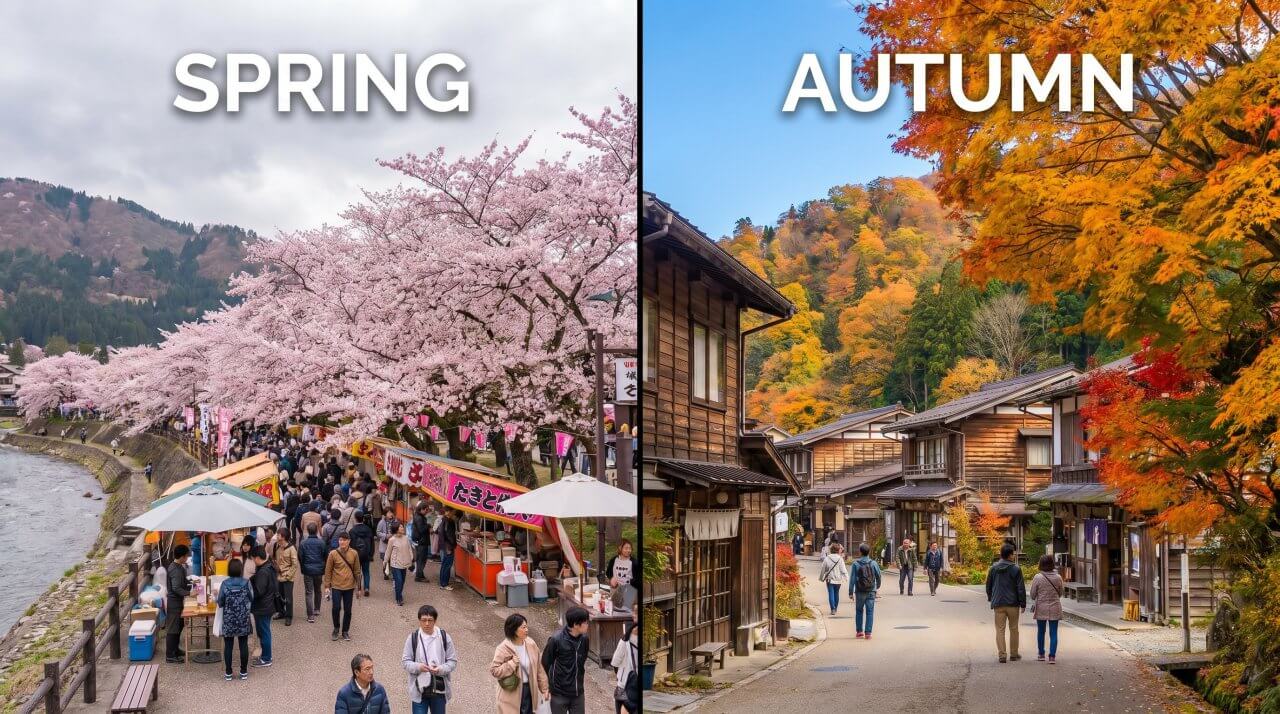
Most travel sites will tell you that the best time to visit somewhere is when the weather is at its finest.
That’s true, in the same way that “the best car is the fastest one” is technically true.
It ignores everything else that matters: what things cost, how crowded they are, whether the specific activities you want to do are even available, and whether the conditions that make a place famous are actually present during your trip.
The timing question almost always involves three variables pulling against each other.
Weather peaks are usually crowd peaks.
Crowd peaks are price peaks.
So the theoretical “best” window tends to be the most expensive and the most packed.
For travelers who can tolerate slightly overcast skies or a bit of humidity, a different month might deliver a far better overall experience.
And for travelers who have a specific purpose, like seeing a seasonal event or doing a particular outdoor activity, the weather-first framing is largely irrelevant.
The Interests field in this tool is where the real decision-making happens.
Two travelers asking about Japan get completely different answers.
One wants to see cherry blossoms; late March through early April is non-negotiable, and they need to know that hotels in Tokyo book out months ahead during that window.
Another wants to hike the Nakasendo trail through mountain terrain; they’re better off in October, when the autumn foliage is at its peak and the summer humidity has lifted.
Same destination.
Opposite timing.
Both correct.
The tool handles this by treating your stated interest as the primary constraint and layering weather, crowds, and cost around it.
What the Output Actually Looks Like: A Concrete Example
To understand what this tool delivers, it helps to see a real destination worked through it.
Consider Morocco as the example, with two different traveler profiles entering their interests differently.
Profile A: Destination: Morocco.
Interests: desert camping, camel treks, stargazing in the Sahara.
Budget: mid-range.
Weather Preference: warm but not extreme heat.
The tool returns a breakdown that immediately flags July and August as problematic: daytime temperatures in Merzouga, the main Sahara access point, regularly exceed 40°C (104°F) during those months, making desert activities genuinely difficult and occasionally dangerous.
It recommends October through November and February through March as the sweet spots for this profile.
Nights are cool enough for comfortable camping, daytime heat is manageable, and the tourist infrastructure is operating.
It also notes that the Sahara sees moderate crowds year-round compared to Morocco’s imperial cities, so crowd management is less of a concern for this particular interest.
Profile B: Same destination.
Interests: exploring medinas, cooking classes, artisan markets, local food culture.
Budget: budget traveler.
Weather Preference: no strong preference.
The tool’s answer shifts considerably.
For medina exploration and market culture, the shoulder months of April, May, September, and October offer both pleasant temperatures and meaningfully lower accommodation prices compared to the December-January European holiday influx or the March spring break wave.
The tool flags Ramadan as a special consideration: restaurant hours and some market stalls operate differently, which is genuinely relevant for someone whose main interest is food culture.
It presents this honestly as context rather than a deterrent.
This is what separates a timing tool from a timing article.
The tool isn’t presenting the “official” best time for Morocco.
It’s answering for your Morocco, based on what you actually want to do there.
How the Tool Handles Seasonal Closures and Local Events
One detail worth knowing: the tool’s output goes beyond temperature and rainfall.
It flags circumstances that would directly affect your experience, including local events that either add or subtract from a visit.
For Morocco, it mentions the Fes Festival of World Sacred Music (typically held in June) as a reason some travelers specifically target that month despite the heat.
For Kyoto, it flags the Gion Matsuri in July as worth considering even though July is technically humid and less comfortable than October.
The tool also notes when things simply aren’t operating.
Mountain huts in the Swiss Alps close in October.
Certain beach resorts in Thailand shut down their beach-facing operations during monsoon months when the water is too rough.
Ice hotels in Scandinavia only exist between January and April.
These are the kinds of context points that a generic seasonal guide misses entirely.
The Shoulder Season Question: When “Slightly Worse” Weather Is a Legitimate Trade
Shoulder seasons get a lot of positive attention in travel writing, sometimes to the point where they’ve become their own crowded conventional wisdom.
“Travel in shoulder season” has almost become as unhelpful as “travel in peak season.” The actual question worth asking is: how much worse is the weather, and what do you get in return?
The tool addresses this directly.
For a destination like Santorini, Greece, shoulder season in May or October means water temperatures that are cooler than August, slightly overcast mornings on some days, and perhaps a 25-30% reduction in accommodation prices compared to the July-August peak.
For most travelers, that trade is clearly positive.
The island looks much the same; you’re not slogging through crowds at every viewpoint; the restaurants have tables available.
The tool will tell you this explicitly.
For other destinations, the shoulder season trade is less favorable.
Visiting the Maldives in May or October puts you squarely in the beginning of the wet season, with afternoon rain squalls that can genuinely disrupt snorkeling and diving plans.
The price difference is real, but the activity disruption can be significant if underwater visibility is your main reason for going.
The tool flags this honestly rather than simply recommending shoulder season because that’s what travel articles do.
What makes the tool’s approach useful here is that it factors in your weather preference input.
If you say you’re comfortable with occasional rain, the October Maldives recommendation shifts.
If you say you need reliable sunshine, it pushes you toward November through March and acknowledges that you’ll pay more for it.
That direct link between your preference and the recommendation is what makes it actually decision-useful, rather than just informative.
If you’re also weighing what the price difference actually means in dollar terms, the AI Trip Cost Estimator lets you run cost projections by month, which makes the shoulder season trade-off concrete rather than abstract.
Destinations Where Timing Is Genuinely Complex vs. Destinations Where It’s Clear
Not every destination presents a complicated timing puzzle.
Some places have obvious answers that barely need an AI to explain them.
Others are genuinely contested, where the “right” time depends on a specific combination of what you want, when you can go, and what you’re willing to tolerate.
The Easy Cases
Year-round tropical destinations like Singapore or most of the Caribbean islands offer relatively consistent conditions throughout the year.
The differences between months are real but moderate.
The tool handles these quickly, noting the wettest months, the driest months, and any specific events worth planning around, without generating a complicated trade-off analysis.
If you’re going to Singapore with no specific agenda, the tool tells you that December to February is slightly more pleasant and April to September is wetter, and leaves you to make a simple call.
Highly seasonal destinations with clear off seasons are the other easy case, just in the opposite direction.
Lapland in Finland during summer months offers an entirely different product from winter: no aurora borealis, no snowmobiling, no ice fishing, but 24-hour daylight and hiking.
If you know which experience you want, the timing question answers itself.
The tool confirms it and adds the practical details.
The Genuinely Hard Cases
The cases where this tool delivers its most distinctive value are the destinations where timing is genuinely contested and depends on priority.
Monsoon destinations in Asia are the clearest example.
Bali, Vietnam, Thailand, and Sri Lanka all have regional monsoons that hit different parts of the country at different times of year.
Bali’s rainy season (approximately November through March) mostly affects Ubud in the interior more than Seminyak on the south coast.
Vietnam’s north and south can be in opposite weather conditions simultaneously.
If you’re visiting multiple regions, any single “best time” recommendation is misleading.
The tool accounts for this by asking which part of the destination you’re visiting, or by breaking down the regional variation in its output.
Four-season temperate destinations like Japan, much of Western Europe, and the American Northeast have multiple “best” windows that serve different purposes.
The tool doesn’t just pick one.
It explains that April suits certain interests, October suits others, and winter suits specific travelers who want to avoid crowds at cultural sites and don’t mind cold weather.
The answer depends entirely on what you enter in the Interests field.
Mountain destinations with altitude considerations add another dimension.
Kilimanjaro has two climbing seasons (January-March and June-October) dictated not just by weather but by the mountain’s own precipitation and cloud cover patterns.
The Himalayas have pre-monsoon and post-monsoon windows that serious trekkers choose based on their route and acclimatization plans.
The tool surfaces these specifics rather than giving a blanket seasonal recommendation.
For regions with seasonal security or health considerations, the tool’s timing output pairs naturally with a separate safety check.
The AI Travel Safety Advisor covers health risks that are month-specific, like disease vectors tied to rainy seasons, or political events that follow annual patterns in certain destinations.
Turning a Timing Recommendation into an Actual Booking Decision
Getting a solid timing recommendation is one thing.
Connecting it to a real trip plan is another step entirely, and it’s where most travelers get stuck.
They learn that October is the best month for their destination, then realize their work schedule only allows for late August, and feel like the whole exercise was pointless.
It’s not.
A good timing recommendation tells you what you’re trading, not what’s impossible.
If you run the tool and find that your available dates fall in a suboptimal window, the output still helps you plan better.
It tells you what to expect so you can prepare accordingly.
Going to Southeast Asia in the wetter months?
The tool’s output will note which activities remain viable, which to avoid, and which regions of the country have better weather during that period.
That’s actionable, even when the timing isn’t ideal.
For travelers with flexible dates, the timing recommendation becomes a planning anchor.
Once you know that May or late September are your target windows for a particular destination, you can start working backward: how many days do you actually need?
The AI Trip Length Guide helps you figure out how much time your destination genuinely requires, which shapes the window you’re looking for in the calendar.
The tool also pairs logically with destination planning when you haven’t fully committed to a location.
If you know you want to travel in February and you’re choosing between Morocco, Portugal, and Jordan, the timing variable becomes a useful input for comparison.
The AI Destination Comparison Tool runs a side-by-side breakdown across climate, cost, and crowd levels for any two destinations, which complements the timing analysis well when your month is fixed but your destination isn’t.
What to Do with the Output After You Have It
Once you have a timing recommendation, the next practical step is checking whether your ideal travel window is feasible.
A few things to verify before you book:
- Flight availability and pricing: School holidays in your home country and major events at the destination both affect airfare, sometimes by hundreds of dollars. The tool’s output will flag major events, but actual pricing requires a fare check.
- Accommodation lead time: Peak windows in popular destinations sometimes require booking 4-6 months out. The tool will tell you when your chosen window is high demand; act on that accordingly.
- Activity-specific availability: Some experiences have narrow windows that don’t perfectly align with general seasonal advice. Confirm directly with operators for anything time-sensitive: specific trekking routes, wildlife migration sightings, festival ticket availability.
- Entry and visa requirements: These don’t change seasonally for most destinations, but some countries have specific visa policies for certain travel periods. The AI Travel Visa Requirements Checker handles this separately.
If you’re planning a shorter trip around a specific target window, the AI Weekend Getaway Planner is worth a look for destinations within a short flight or drive.
The timing logic applies to short breaks too, and the tool handles the compressed schedule well.
Why the Interests Field Changes Everything
It’s worth restating this point because it’s the part most travelers underestimate.
The Interests input isn’t just a filter.
It’s the variable that determines which of the many legitimate “best times” actually applies to your trip.
In our experience testing the tool across destinations with radically different seasonal profiles, the output shifts most dramatically when the interest is highly specific.
“Sightseeing” produces a fairly standard seasonal recommendation.
“Whale shark diving in the Ningaloo Reef” produces an answer pointing precisely to March through July, because that’s when whale sharks aggregate in that specific location.
“Attending the Carnival in Rio de Janeiro” produces an answer that locks you into February with no ambiguity whatsoever.
The more specific your interest, the more confident the tool’s recommendation becomes, because specific activities have specific windows.
This also means the tool rewards honesty in how you describe your interests.
Vague entries like “beaches and culture” produce broader, less decisive outputs.
That’s not a flaw; it’s accurate.
If you genuinely have no strong activity preference, your timing is more flexible, and the tool reflects that.
But if you have a specific motivation for the trip, even a secondary one, entering it produces a sharper and more useful answer.
The tool handles conflicting interests in a useful way that generic seasonal guides can’t.
If you enter “hiking and beach activities” for a destination like New Zealand’s South Island, the output doesn’t just pick one.
It explains that November through February suits beaches and coastal walks while June through August offers the alpine experiences, and then suggests whether a shoulder month like April or November gets you a reasonable overlap.
That kind of nuanced reasoning is exactly what makes a dedicated timing tool worth using over a travel forum thread.
For travelers building out a full trip once the timing is settled, the AI Itinerary Planner takes your destination, dates, travel style, and budget and generates a day-by-day plan.
The two tools work well together: timing first, then structure.
Getting the Most from the Tool
The tool works best when you give it a genuine brief rather than minimal inputs.
A destination alone will generate a useful general breakdown.
Adding your interests, even a rough description, shifts the output from generic to specific.
Adding a weather preference, even a simple one like “prefer dry weather” or “can tolerate rain,” gives the tool a constraint to reason against.
The Budget field, when filled in, factors in price variation by season in a way that can meaningfully change which month comes out as the recommendation.
One approach worth trying: run the tool twice with different interest profiles if you’re traveling with someone whose priorities differ from yours.
You might find that one travel window satisfies both sets of interests reasonably well, or you might discover that you’re genuinely optimizing for different months and need to make an explicit call about which priority wins.
The currency field is a small but practical feature.
Cost comparisons across seasons are returned in your home currency, which makes the price variation across months genuinely comparable rather than abstract.
If the tool tells you that high season accommodation runs roughly 40% higher than shoulder season for your destination, that number lands differently when it’s expressed in the currency you actually think in.
Travel timing is a decision that most people make either too casually (choosing dates based on when they can get away) or too rigidly (refusing to consider anything other than the theoretical “best” month).
The right answer is usually somewhere in between: know what you’re optimizing for, understand the trade-offs in every window, and make an informed call.
That’s exactly what this tool is built to help you do.
For a broader overview of what’s available across the planning toolkit, the full suite of AI travel planning tools on GetOutTrip covers everything from itinerary building and cost estimation to visa checks and destination comparison.
Frequently Asked Questions (FAQs)
Yes. For destinations with well-documented seasonal events, such as Japan’s cherry blossom season, Rio’s Carnival, or Lapland’s Northern Lights window, the tool incorporates those events into its timing recommendations and notes whether they are a reason to visit or avoid that period depending on your crowd preference.
Enter your fixed travel period as context and the tool will give you a realistic assessment of what to expect during that time, including what adjustments to make to activities, booking lead time, and expectations.
Knowing you are traveling in a suboptimal window is more useful than ignoring the timing entirely.
The tool typically recommends a best window of one to two months rather than a single date, and often identifies a secondary window for travelers who cannot make the primary period.
It also flags months to avoid, which is often as useful as knowing the best time to go.